RemoteVoice: talk to your Mac with a Bluetooth remote
- Compatible device
- A supported ATVV Bluetooth remote, primarily Xiaomi Bluetooth Voice Remote 2 Pro.
- Transcription
- Whisper runs locally. Qwen requires Apple silicon and a compatible MLX environment.
- How to get it
- Download the source ZIP and build on your Mac.
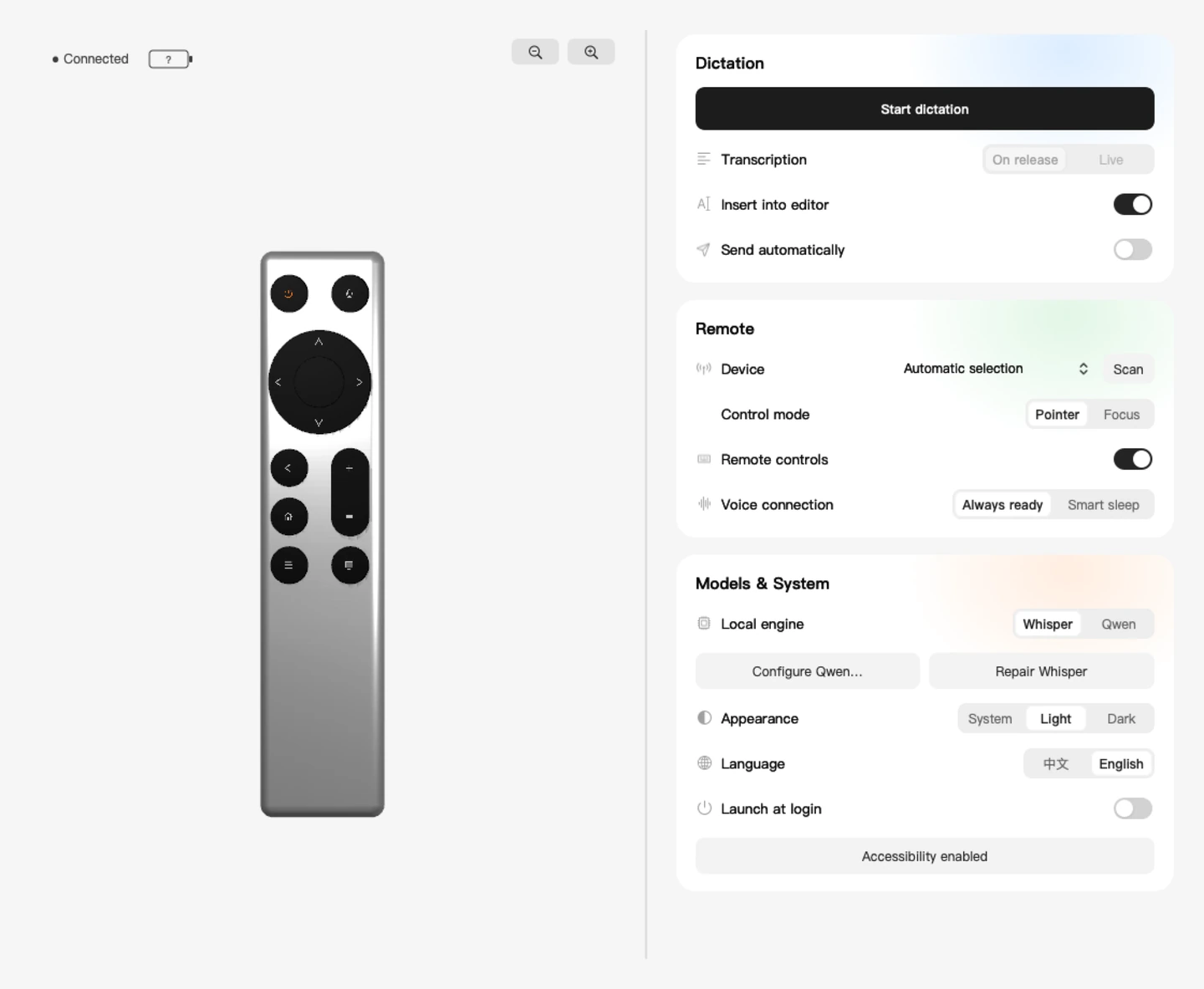
RemoteVoice turns a compatible Bluetooth voice remote into a Mac input device. Open a task in Codex, select its input field, then hold the remote’s voice button and describe what you want to do. Release the button to finish recording.
With input enabled, the transcript appears in Codex for editing. Sending is manual by default, so you can correct a filename or add a detail before submitting. You can also keep the recording and transcript on your Mac for later.
What you need
Use macOS 14 or later and a Bluetooth voice remote that supports the ATVV protocol. Testing has focused on the Xiaomi Bluetooth Voice Remote 2 Pro. A remote can pair with macOS even when its voice service is incompatible.
Building the app requires Swift 6 with Xcode or the Command Line Tools. Builds on Apple silicon have been verified. The Intel Whisper path is available in the source and still needs hands-on testing. Install Codex if you want to use the editor and sidebar actions.
Download and build RemoteVoice
Download the 0.2.2 source ZIP, extract it and open Terminal in the extracted folder. Run the setup command below. Setup checks the environment, prepares the multilingual Whisper small model (about 488 MB), verifies its checksum, and builds and installs RemoteVoice in your user Applications folder.
./scripts/setup.shThe ZIP contains the source and setup scripts. The app is signed locally during the build. First-time setup downloads the Whisper model, so it needs an internet connection.
Pair your remote and test a recording
Pair the remote in macOS Bluetooth settings. In RemoteVoice, open device selection, scan, and choose the paired remote. Check the Bluetooth permission and the selected model before starting the voice service.
For your first test, leave Insert into editor and Send automatically off. Hold the voice button, say a full sentence and release. Open Recordings and Transcripts from the menu bar and check for the recording and its matching transcript. The connection indicator shows the Bluetooth link. Check the recording itself to confirm the audio service is working.
Choose how transcription appears
Whisper transcribes the full recording when you release the button. Qwen can also show partial text as you speak, then reprocess the full recording on release to refine the final text.
Qwen runs locally on Apple silicon with a compatible Python and MLX environment. In Models & System, choose the Python executable and the complete model folder. The Qwen weights are a separate download. Recognition speed depends on your Mac, model and recording quality.
Review the prompt in Codex before sending
Open Codex, select the input field for your task, and turn on Insert into editor in RemoteVoice. Dictate a request such as “Review the current branch for changes that could affect sign-in.” The resulting text goes into the editor when the input field is available.
Keep Send automatically off to check filenames, commands and product terms before you submit. You can switch off editor input whenever you only want to record and transcribe. macOS Accessibility permission is needed for editor input and remote-driven pointer or keyboard actions.
Navigate with the remote
Press TV to switch modes. In pointer mode, the direction buttons move the pointer and the centre button clicks. In focus mode, they send arrow keys and Return. With the default mappings, Home scrolls down on a single press and up on a double press, while the volume buttons move between items in the Codex sidebar.
Drag the 3D remote in the app to inspect it, then click an editable button to change its action. RemoteVoice saves your selected mode. The voice and menu buttons keep their assigned system functions.
Local recordings and troubleshooting
The remote captures audio and the Mac runs recognition. Recordings and transcripts are kept locally and are available from the menu bar. Bluetooth lets the app receive audio and read the battery level. Accessibility enables input and control in other apps.
If Bluetooth is connected but no recording appears, check the selected device and restart the voice service. If the recording appears without text, check the chosen model and runtime. If the text is saved but does not appear in Codex, check Insert into editor, the target input field and Accessibility permission.
RemoteVoice builds on MI-AO by FanXeon@Poemcoder with Codex and retains the upstream MIT license.